
Table of Contents
ToggleIntroduction
Not every workshop needs the same tapping setup. A Portable Tapping Machine can offer the flexibility needed for large, irregular, or difficult-to-move components, while a fixed system can make more sense when production follows a repeatable workstation process. The right choice depends on your workflow, component size, production volume, thread requirements, and how much flexibility your operators need.
That is why comparing these two approaches is useful before investing in new equipment.
The question is not simply which system is more powerful. It is which system makes your production easier, faster, and more consistent.
What Are Mobile and Fixed Tapping Systems?
At a basic level, the difference comes down to where the tapping operation takes place.
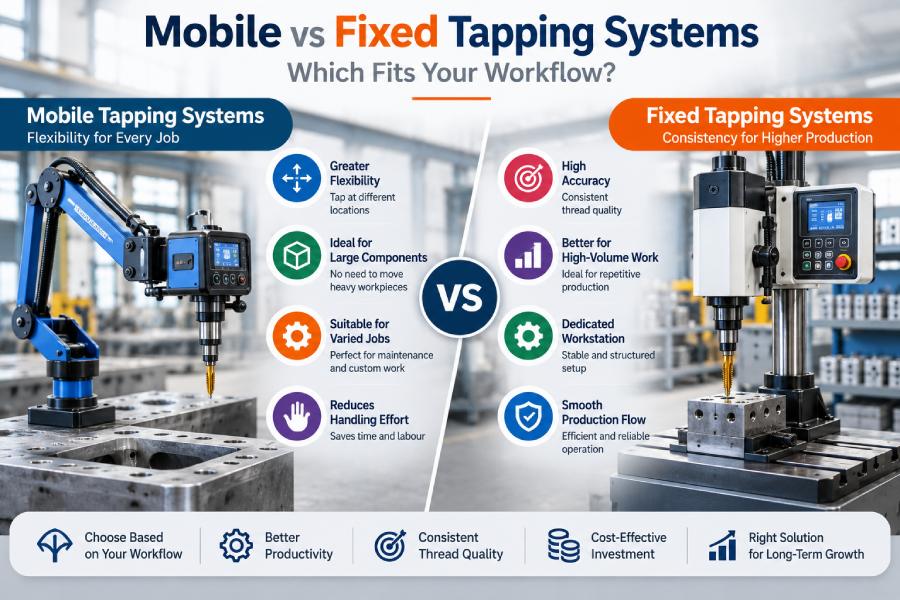
A mobile setup can be positioned or moved around the workpiece. A fixed setup remains installed at a designated workstation.
Mobile systems are generally useful for
- Large components
- Heavy workpieces
- Fabricated structures
- Components with multiple tapping locations
- Maintenance applications
- Flexible production environments
- Jobs where moving the workpiece is inconvenient
Fixed systems can be useful for
- Repetitive production
- Standard-sized components
- Dedicated production stations
- High-volume work
- Consistent component positioning
- Controlled production layouts
Neither approach is automatically better. The correct choice depends on how your workshop operates.
Mobile Tapping Systems Explained
A Mobile Tapping Machine is designed around flexibility.
Instead of requiring every component to be brought to one fixed location, the tapping equipment can be positioned where the operation needs to happen.
This can be particularly useful when the component is:
- Large
- Heavy
- Difficult to reposition
- Structurally complex
- Too large for a conventional workstation
Where Mobile Systems Have an Advantage
Imagine a large fabricated frame with tapping points spread across different sections. Moving that frame repeatedly to a fixed machine could consume significant time and handling effort.
A mobile system can bring the tapping operation closer to the component.
Key advantages include
- Greater workspace flexibility
- Easier handling of large components
- Reduced component movement
- Access to different tapping positions
- Potentially lower handling requirements
- Useful for varied production jobs
For workshops where component dimensions change frequently, this flexibility can be valuable.
Fixed Tapping Systems Explained
A fixed tapping system is installed at a specific workstation. The component is brought to the machine, positioned, secured, and tapped.
This approach works particularly well when the production process is predictable. For example, a workshop producing hundreds or thousands of similar components may benefit from a dedicated tapping station.
Fixed systems can provide
- Consistent workstation setup
- Repeatable component positioning
- Structured production flow
- Easy operator access
- Efficient repetitive operation
- Integration into production lines
The more predictable your components and production sequence become, the more attractive a fixed system can be.
Mobile vs Fixed Tapping Systems at a Glance
| Factor | Mobile System | Fixed System |
|---|---|---|
| Flexibility | High | Moderate |
| Large components | Well suited | May require handling |
| Repetitive production | Suitable | Highly Suitable |
| Workspace requirements | More adaptable | Dedicated area required |
| Component movement | Often reduced | Often reduced |
| Production layout | Flexible | Structured |
| Multiple tapping locations | Convenient | May require repositioning |
| Setup consistency | Depends on operation | Generally high |
| Application variety | High | Best for defined applications |
The table gives a starting point, but your actual production conditions should drive the final decision.
When a Mobile System Makes More Sense
A mobile setup deserves serious consideration if your workflow involves changing component sizes or tapping positions.
1. You Work With Large Components
Large fabricated parts can be difficult to transport between workstations. Bringing the machine to the component may be more practical.
2. Tapping Locations Vary
If holes appear in different positions across a component, flexibility becomes important. The operator can position the system according to the job rather than repeatedly repositioning the component.
3. Your Production Mix Changes Frequently
Job shops often handle different components throughout the day. A flexible tapping solution can make these transitions easier.
4. Material Handling Is Expensive
Every additional movement requires time and resources. Reducing unnecessary component handling can improve the overall workflow.
When a Fixed System Is the Better Choice
A fixed system can be a strong option when your operation is highly repetitive.
1. You Produce Similar Components
If most components have similar dimensions and tapping requirements, a dedicated station can be efficient.
2. Production Volume Is High
Repeated operations benefit from standardised positioning and predictable workflows.
3. You Want a Dedicated Workstation
A fixed setup can provide a clearly defined area for tapping. This can simplify operator training and production planning.
4. You Are Building a Structured Production Line
Fixed equipment can integrate naturally into a planned manufacturing sequence.
Key Factors to Consider Before Buying
Choosing between mobile and fixed equipment should involve more than machine price. Consider these factors first.
Component Size
Ask
- What are the smallest components?
- What are the largest components?
- How heavy are they?
- Can they be moved easily?
Production Volume
Consider
Parts per shift
- Parts per day
- Batch sizes
- Number of tapping operations per component
Thread Requirements
Review
- Thread sizes
- Material
- Hole depth
- Blind or through holes
- Required thread quality
Workspace
Check
- Available floor area
- Machine reach
- Component access
- Operator movement
- Power availability
Future Requirements
Think beyond today’s production. Will component sizes change?
Could production volume increase?
Will you add new products?
A machine should ideally support your realistic future requirements without forcing you to overinvest today.
Productivity and Workflow Considerations
Productivity is not just about how quickly a spindle rotates. Your complete workflow matters. Consider the following sequence:
Move component → Position component → Secure component → Align machine → Tap → Inspect → Move component again
If the component is large and difficult to handle, the movement and positioning steps can take more time than the tapping operation itself. A mobile system may reduce some of these handling steps.
With a fixed setup, however, repetitive components can often move through a predictable workstation sequence.
Compare the complete cycle
When evaluating equipment, measure:
- Setup time
- Positioning time
- Tapping time
- Tool change time
- Inspection time
- Component handling time
This provides a more realistic productivity comparison than spindle speed alone.
Accuracy and Thread Quality
Accuracy matters regardless of which system you choose. A flexible machine is only useful if it can deliver consistent results.
Likewise, a fixed machine does not automatically guarantee perfect threads.
Look at
- Spindle alignment
- Tapping depth control
- Tool holding
- Reversing mechanism
- Machine stability
- Operator positioning
- Repeatability
For mobile operations, positioning technique can become especially important. The machine should be properly aligned and securely positioned before tapping begins.
For fixed systems, repeatable workholding and consistent component placement can help maintain uniformity.
Operator Convenience and Ergonomics
The operator is part of the workflow.
A machine that is technically capable but uncomfortable to use can create unnecessary fatigue and slow production.
Mobile Systems
Potential benefits include:
- Less movement of heavy components
- Greater access to different areas
- Flexible positioning
- Easier access to large structures
Fixed Systems
Potential benefits include
- Dedicated workstation
- Predictable operating position
- Consistent component placement
- Familiar operator routine
Consider how often operators need to lift, reach, reposition, or manually align components. Reducing unnecessary physical effort can improve the working environment and potentially support more consistent production.
Pros and Cons
Mobile Tapping System
Pros
- High flexibility
- Suitable for large workpieces
- Useful for changing jobs
- Can reduce component movement
- Convenient for multiple tapping locations
- Adaptable workshop layout
Cons
- Positioning must be managed carefully
- Operator technique can influence setup
- May not be ideal for highly repetitive production
- Workspace and machine mobility need to be considered
Fixed System
Pros
- Excellent for repetitive work
- Dedicated workstation
- Consistent setup
- Structured production flow
- Convenient for standard components
- Suitable for controlled production environments
Cons
- Requires dedicated space
- Components need to reach the workstation
- Less flexible for oversized components
- Repositioning may be necessary for complex parts
How to Choose the Right System
A simple decision framework can help.
Choose a mobile setup if
- Your components are large or heavy.
- Tapping locations vary considerably.
- You frequently change jobs.
- Component movement takes significant time.
- You need greater flexibility.
- Your production environment is not highly standardised.
Consider a fixed setup if
- Components are relatively standard.
- Production volumes are high.
- The same tapping operations are repeated frequently.
- You have a dedicated workstation.
- Consistent positioning is important.
- Your production line follows a predictable sequence.
Still unsure?
Ask yourself one question: Is it easier to move the machine to the component or the component to the machine?
For many workshops, the answer quickly clarifies which direction makes more sense.
Where an Industrial Tapping Machine Fits In
An Industrial Tapping Machine can be selected for different production environments depending on capacity, automation, accuracy, and workflow requirements.
The key is not to assume that one machine style will suit every manufacturing application.
Instead, compare the equipment against
- Material
- Thread range
- Component size
- Production volume
- Accuracy
- Cycle time
- Tooling
- Operator requirements
- Available workspace
- Maintenance needs
This application-first approach can help manufacturers avoid buying equipment based solely on specifications or initial price.
Conclusion
The mobile versus fixed decision ultimately comes down to how your workshop works.
A mobile setup can make more sense when flexibility, large components, changing jobs, and reduced material handling are priorities. A fixed system can be more effective when production is repetitive, components are standardised, and a dedicated workstation supports the process.
Before making a purchase, look beyond the machine itself. Consider the entire production workflow, from component handling and positioning to tapping, inspection, and removal.
The right system should make that workflow simpler, more consistent, and easier for your operators to manage.
FAQ’s
A Mobile Tapping Machine is generally useful when components are large, heavy, irregular, or difficult to move to a dedicated workstation. It can also help when tapping locations vary across the workpiece.
A Mobile Tapping System can reduce unnecessary movement of large components by allowing the tapping equipment to be positioned closer to the required tapping location.
Compare the two based on component size, production volume, thread requirements, setup time, handling requirements, accuracy, workspace, operator convenience, maintenance, and overall workflow rather than price alone.
Find a tapping setup that works around your production needs.